Setting up a GitOps Cloud-Native continuous integration chain on OpenShift/Kubernetes
The GitOps model has become a must in recent years, and many products around this paradigm have emerged to meet these new needs. RedHat, through its OpenShift Container Platform, has extended its distribution with integrations of open source products such as ArgoCD (OpenShift GitOps) and Tekton (OpenShift Pipeline). In this blogpost, we will see the benefits of these new tools and the associated uses through a practical case. We will detail the essential functionalities of each solution and their complementarities in the context of a CI/CD GitOps integration chain.
This blogpost will be broken down into two parts:
- Introducing the fundamental concepts of OpenShift Pipelines and OpenShift GitOps tools,
- Setting up a GitOps CI/CD pipeline on the OpenShift platform.
OpenShift Pipelines
Overview
OpenShift Pipelines is a Cloud Native integration and continuous delivery solution for building CI/CD pipelines. It is based on the open-source Tekton project. This native Kubernetes CI/CD framework allows to automate deployments on several platforms (OpenShift, Kubernetes, Virtual Machine, serverless …).
Cloud-Native CI/CD
A Cloud Native CI/CD pipeline is built on the following 3 pillars:
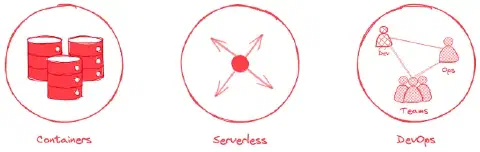
- Containers: Designed for containerized applications and running on Kubernetes,
- Serverless: Runs without a CI/CD engine to manage and maintain (example: GitLab CI, Jenkins Server, Bitbucket…)
- DevOps: Designed with microservices and distributed teams in mind.
The characteristics of Tekton
Here are the main features:
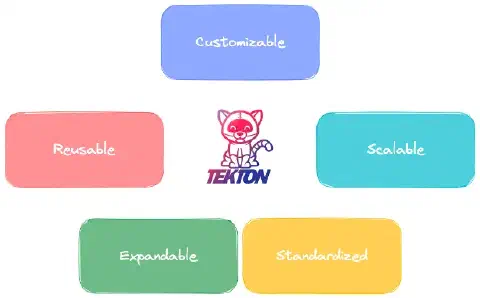
- Customizable: Tekton entities are fully customizable which allows DevOps engineers to create a varied catalog and make it available to developers,
- Reusable: the resources are portable and can be distributed to different teams within the organization. Once defined, they are ready to be used by all teams,
- Extensible: A catalog and a Hub (Tekton Hub) are available. They represent community repositories that allow you to reuse code snippets and overload them with your own developments,
- Standardized: Tekton is installed and run as an extension of your Kubernetes cluster using an operator (CustomResourceDefinition and CustomResources) allowing the management of Tekton objects like any other Kubernetes object. Tekton workloads run in containers,
- Scaling: To increase the resources related to your Cloud Native CI/CD workloads, simply add nodes to your cluster without having to change resource allocations or modify pipelines.
The Tekton Project
The Tekton project consists of two entities Tekton Pipelines and Tekton Triggers.
- Tekton Pipelines is a component defining a set of Kubernetes CustomResource (CR) to build a cloud-native CI/CD pipeline.
- Tekton Triggers is another component to detect and extract event information from various sources but also to instantiate/execute pipelines.
These two components are complementary for the implementation of a complete CI/CD integration chain.
Tekton Pipelines
The Tekton Pipelines project is composed of several types of CustomResource Kubernetes:
- Task
- Step
- Pipeline
- TaskRun
- PipelineRun
Here is the hierarchical tree structure of OpenShift Pipelines CustomResource :
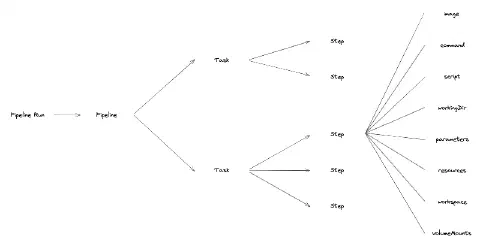
Task
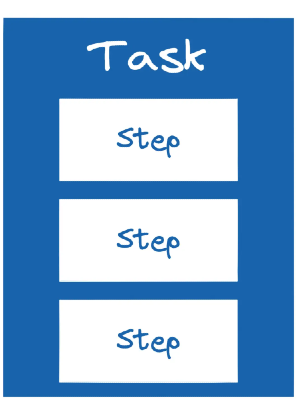
Tasks are the smallest elements that make up the Tekton Pipelines project. They represent the definition/declaration of a unit of work to be executed. Examples of Tasks are the packaging of a Java project, the build of a container or the vulnerability scan of a container image.
Tasks have Input and Output parameters in order to be dynamic. It is also possible to configure Workspaces to share data between different Tasks. Tasks can be executed independently from a pipeline. It is also possible to use predefined Tasks, developed by the community.
To perform Tasks, we need to define a list of Steps to execute sequentially.
Step
Steps allow to execute actions using commands or scripts in containers (pods). They have the advantage of taking the characteristics of the Kubernetes parameters that we already know:
- Image
- Environment variable
- Volume
- ConfigMap
- Secret
- …
An example of a Step in a Task to package a Java project is the definition of the project version, or the creation of the jar.
|
Pipeline
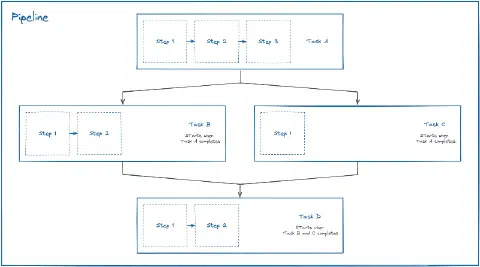
The Pipeline defines the execution order of the Tasks. Like a Task, it represents the definition/declaration of a sequence of Tasks. Its role is to orchestrate the execution of Tasks using conditions, to restart Tasks and to define Inputs, Outputs and Workspaces allowing data sharing between Tasks.
Here is a diagram illustrating the orchestration of Tasks when setting up a pipeline:
TaskRun
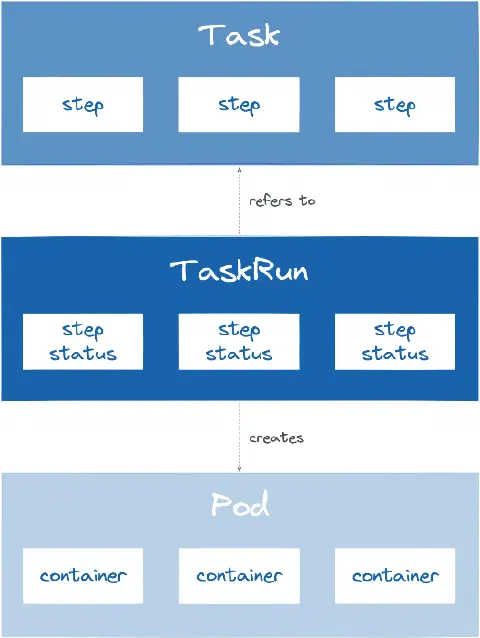
The TaskRun represents the instantiation/execution of a Task. It is executed as pods, on the Kubernetes/OpenShift cluster. It references a specific Task or allows the declaration of a Task directly in the TaskRun.
The TaskRun provides data to Tasks:
- Parameter
- Resource
- Service Account
- Workspace
Interaction between different Kubernetes CustomResource during the execution of a Task:
PipelineRun
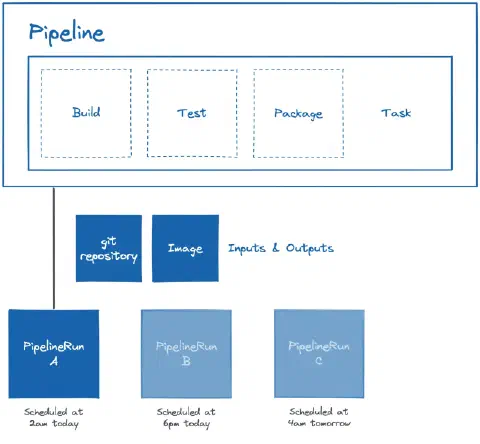
The PipelineRun allows the instantiation/execution of a Pipeline. It references a specific Pipeline or allows the declaration of a Pipeline directly in the PipelineRun.
Like a TaskRun, the PipelineRun provides data to the Pipeline:
- Parameter
- Resource
- Service Account
- Workspace
Interaction between different Kubernetes entities when running a Pipeline:
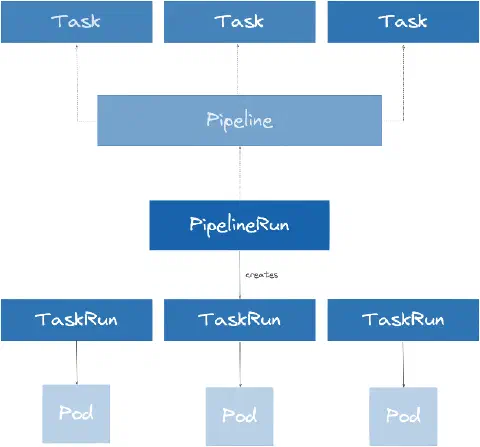
Example of PipelineRun instantiation from pipelines at different times:
Tekton Triggers
The Tekton Triggers project is composed of several types of CustomResource Kubernetes:
- Event Listener
- Trigger
- Interceptor
- TriggerBinding
- TriggerTemplate
Event Listener
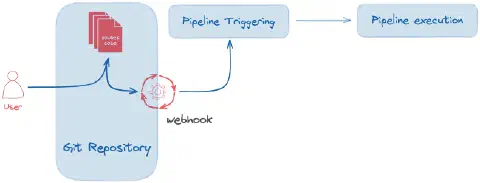
The EventListener is a resource deployed in the Kubernetes/OpenShift cluster to listen for events from a third-party application (webhook). This resource allows to detect and forward the event to one or more referenced Triggers.
Trigger
The Trigger allows you to specify on which type of event the pipeline will be triggered. For example, the push of a new commit to the repository manager, the approval of a merge request… A Trigger specifies a TriggerTemplate CR, a TriggerBinding and generally an Interceptor parameter.
Interceptor
The Trigger specifies an interceptor allowing to filter the useful data, to secure the exchanges with a secret (token), to transform the meta data as well as to define and test the triggering conditions. Here is the list of interceptors:
- Webhook
- GitHub
- GitLab
- BitBucket
- CEL
- …
TriggerBinding
The TriggerBinding resource allows to recover the data intercepted and transformed by the Trigger and to transmit them to the TriggerTemplate.
TriggerTemplate
The TriggerTemplate specifies a template for the TaskRun or PipelineRun resources to instantiate/execute when the EventListener detects an event. It allows to expose the parameters dynamically retrieved during the event and to use them to execute the PipelineRun/TaskRun.
Here is a diagram of the execution of a classic Continuous Integration workflow:

OpenShift GitOps
Overview
OpenShift GitOps is a declarative model-based continuous delivery (CD) solution for Kubernetes/OpenShift based on the open source ArgoCD project. It enables infrastructure configuration management as well as application updates in a Git repository manager.
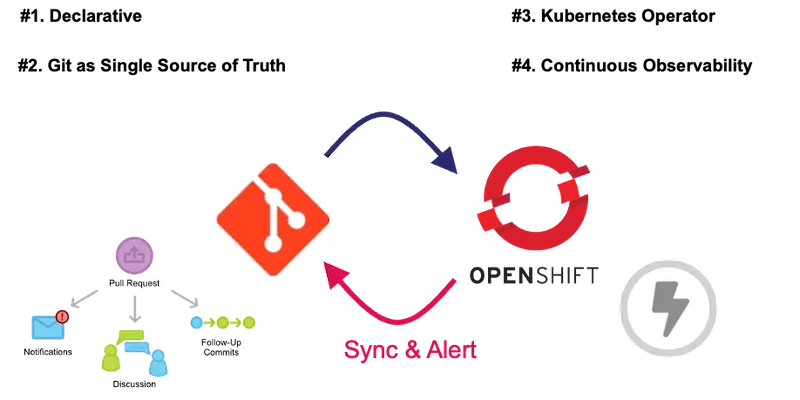
The 4 fundamental pillars
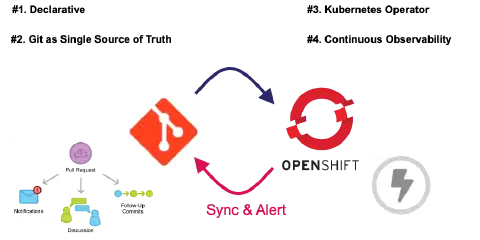
The GitOps model is based on 4 fundamental pillars:
- The declarative approach: the entire system is described declaratively,
- The Git repository as the only source of truth: declarative changes allow you to consider changes as transactions allowing versioning, traceability or access control,
- A Kubernetes operator: approved changes to the desired state are automatically applied to the system thanks to the operator scanning the Git repository in real time,
- Continuous observability: software agents ensure accuracy and alert in case of discrepancies.
Push vs Pull Method
When we talk about GitOps there are two types of approaches. The classic Push approach and the Pull approach more associated with GitOps.
To have a detailed description of the two types of approaches and their specificities, you can refer to an article previously written on the SoKube blog the GitOps and the Millefeuille dilemma.
The ArgoCD project
The ArgoCD project is composed of several types of resources:
- AppProject
- Application
- ApplicationSet
In the context of this blogpost we will mainly use the AppProject and Application resources.
AppProject
The AppProject represents a logical grouping of applications. This Kubernetes CustomResource allows you to define from which Git repository manifests can be retrieved, in which cluster and namespace applications should be deployed, an RBAC section to establish access control to Kubernetes resources and finally which type of Kubernetes object can be created.
Application
An Application in ArgoCD represents an application deployed in an environment within the Kubernetes cluster. It allows you to specify the Git configuration with the repository URL, the branch, the folder or the environment in order to retrieve and deploy the Kubernetes manifests. It is also possible to configure other parameters such as the deployment destination (cluster and namespace), the synchronization policy or the type of deployment (Kubernetes native manifests, Helm or Kustomize).
Cloud-Native GitOps Pipeline
After having seen and explained the concepts related to OpenShift Pipelines and OpenShift GitOps in the first part of the article, we will in this second section, highlight the interaction between these different tools. The objective will be to build a GitOps Cloud Native CI/CD pipeline for the deployment of an application called Fruitz. This one is composed of two microservices:
A backend developed in Java Quarkus: Fruit Quarkus,
A frontend based on Angular technology.
For this demonstration, the Cloud-Native GitOps pipeline will be built only around the Java fruitz-quarkus microservice. It will be composed of a standard CI (Continuous Integration) orchestrated by OpenShift Pipelines (Tekton) and a CD (Continuous Deployment) managed by OpenShift GitOps (ArgoCD). For the purpose of this tutorial, we have intentionally introduced an application limitation (bug) on the Java fruitz-quarkus backend. The objective is to correct this limitation using the GitOps Cloud-Native CI/CD pipeline and to demonstrate the benefits.
To respect the GitOps pattern, the application code and the deployment code (GitOps) will be hosted in two distinct repositories on the The DevSecOps Platform platform. The Fruit-Deploy GitOps repository will use the Helm manager package to deploy the application within the OpenShift cluster.
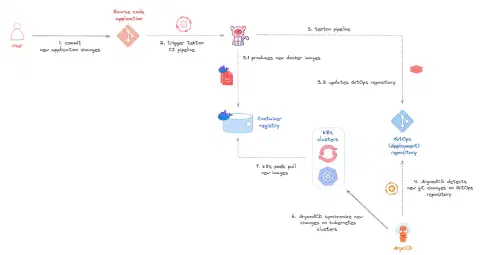
Workflow GitOps CI/CD pipeline:
Installation of tools
Installation of OpenShift Pipelines and OpenShift GitOps operators
This demo will be orchestrated around the Red hat OpenShift platform. You will need to have a working OpenShift cluster with cluster-admin permissions. If you want to deploy an OpenShift cluster on AWS you can refer to the article How to deploy an Openshift cluster in AWS on the SoKube blog.
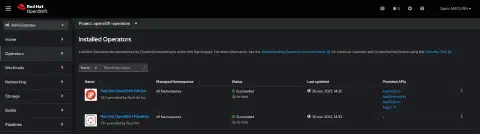
Connect to the OpenShift console and install the RedHat OpenShift GitOps and RedHat OpenShift Pipelines operators:
StorageClass installation
In order to be able to provision volumes (PersitentVolume) dynamically during the execution of Tekton pipelines, but also to deploy applications, you can, for testing purposes, deploy and use the Kubernetes NFS Subdir External Provisioner project which will allow to create a StorageClass based on NFS. In our case we will use the StorageClass called nfs-client.
StorageClass nfs-client:
|
OpenShift GitOps
After installing OpenShift Pipelines through the console, we will now deploy the AppProject and the ArgoCD Application. Create the following manifests:
AppProjet fruitz-deployment:
|
Application fruitz-helm :
|
To allow OpenShift GitOps to access the repository where the code is hosted, if it does not have public visibility, then it is necessary to create a Kubernetes Secret with the private key allowing ArgoCD to access it:
Secret private-repo :
|
ℹ️ Remember to put your SSH private key.
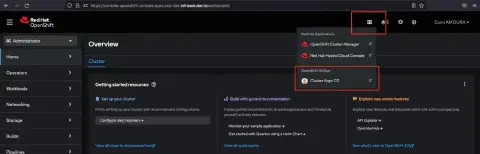
From the OpenShift console, click on the small menu, then select Cluster ArgoCD to get to the ArgoCD application:
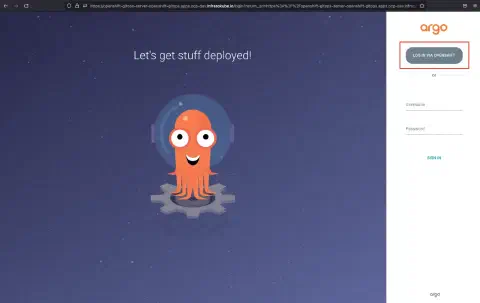
OpenShift GitOps allows SSO integration using the one already built into OpenShift. On the OpenShift GitOps authentication page select LOG IN VIA OPENSHIFT to use the OpenShift SSO and authenticate:
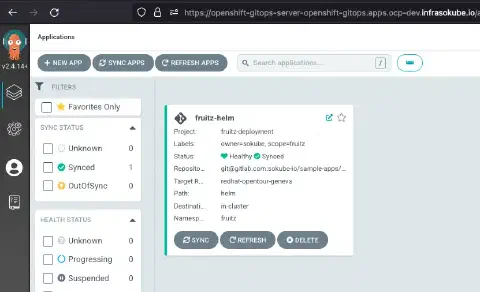
Then on the page of the applications ArgoCD, we can note that the application fruitz-helm is present as well as in state Synced:
Now, you can click on the application to get an overview of all deployed objects:
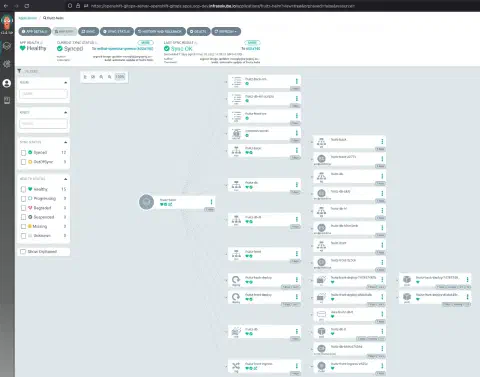
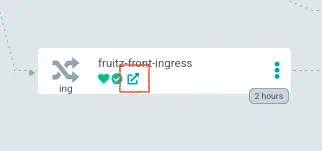
On the fruitz-front-ingress object at the bottom of the page, you can click to open the frontend web page of the application:
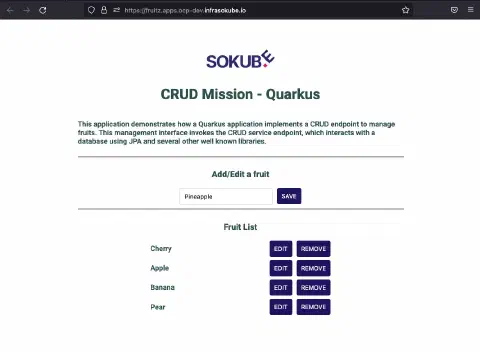
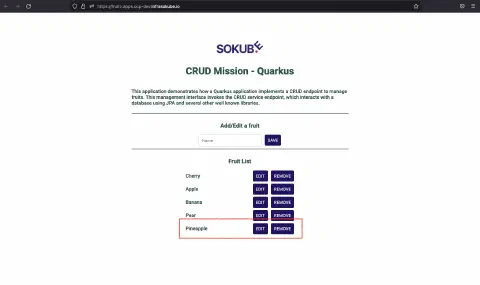
You are now on the frontend page of the application. You can test that it works correctly with the addition of the fruit Pear. However, adding all the fruits does not work. Indeed, we can also try to add the fruit Pineapple, and see that the fruit is not added. This behavior/bug is of course expected. It is this one in particular that highlights the benefit of combining the ArgocCD and Tekton tools with the implementation of a GitOps Cloud Native CI/CD pipeline correcting the intentionally introduced bug/behavior.
We add the Pear fruit that now appears on the web interface. We then try to add the Pineapple fruit which does not work and does not appear on the web interface:
When analyzing the stack trace by querying the backend pod logs, we see the following error ERROR: value too long for type character varying(6). The size of the string is too long:
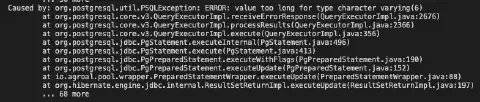
Indeed, the size of the string is limited to 6. This corresponds to the yellow highlighted code:
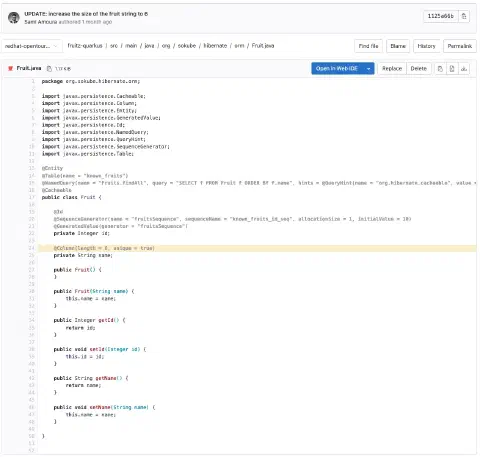
We explicitly specified the constraint that the string for the fruit name could not exceed 6 characters.
OpenShift Pipelines
After demonstrating that our application was functional but intentionally limited, in this part we will show how to have a complete integration chain allowing the developer to accelerate the development of his application by creating a Continuous Integration (CI) pipeline directly from the commit of a new feature thanks to Tekton and deploy the new image in the OpenShift cluster thanks to ArgoCD.
Tekton Trigger
Create the OpenShift cicd project (namespace):
|
You will need to create the following manifests:
- An EventListener: this resource allows you to create an entry point on our OpenShift cluster in order to trigger the pipelines:
- A TriggerBinding: this resource is used to bind the retrieved metadatas to the pipelines
- A Trigger: this resource allows to define the type of interceptor (e.g. GitLab, GitHub …) but also on which type of event to trigger the pipelines but also to extract and transform on the recovered metadatas
- A Secret used by the Trigger containing the token which will be associated to the webhook allowing the authentication
- A TriggerTemplate allowing to variabilize the pipeline that will be triggered.
EventListener gitlab-listener-interceptor:
|
Creating this resource results in the creation of an OpenShift Route. You will need the host linked to this route when creating a webhook. To retrieve the host linked to the route, enter the following command:
|
The result is as follows:
|
TriggerBinding gitlab-triggerbinding:
|
Trigger gitlab-listener:
|
The associated secret gitlab-trigger-secret:
|
⚠️ This secret should also be used when creating the webhook on GitLab.
TriggerTemplate gitlab-triggertemplate :
|
After creating the different Kubernetes resources, we need to create a webhook on the Java fruitz-quarkus application repository that will allow to take into account the changes according to the type of event and to transmit them to Tekton. In our case, when a new commit is pushed to the fruitz-quarkus repository, a Continuous Integration (CI) pipeline will be automatically triggered.
As a reminder, we use the GitLab SCM. In the project, please go to the sidebar and click on Settings ► Webhook:
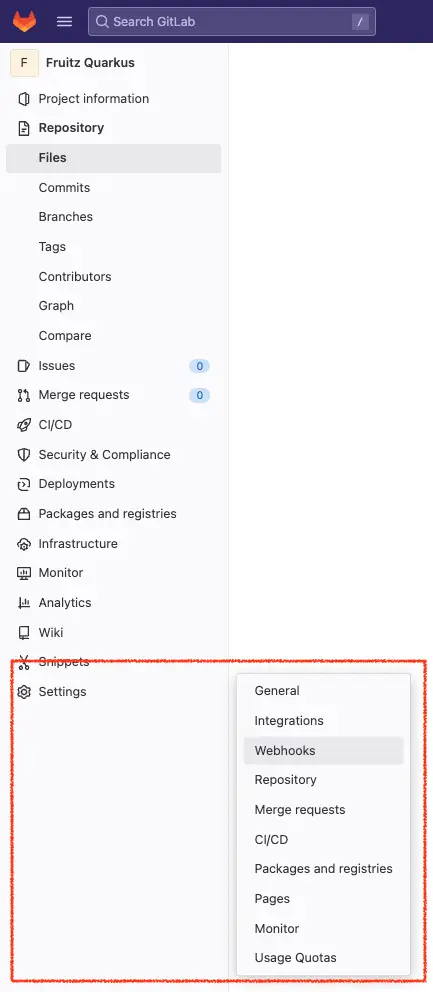
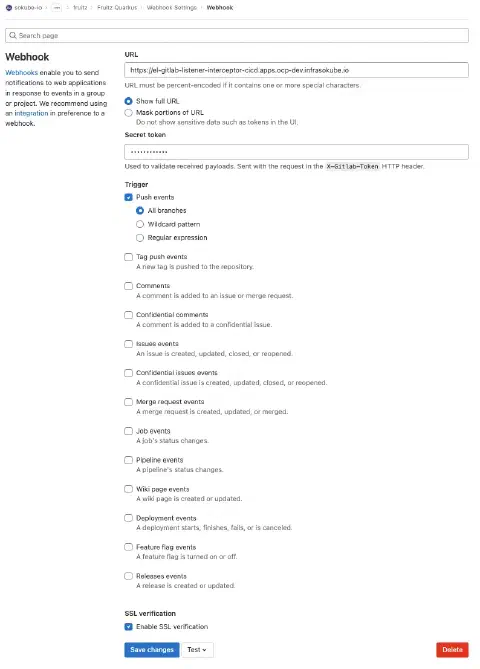
Then enter the following information:
- URL:
https://el-gitlab-listener-interceptor-cicd.apps.ocp-dev.infrasokube.io - Secret Token:
abcdefghijklmnopqrstuvwxyz0123456789ABCDEF - Trigger:
- Push events
- All branches
- Push events
- SSL verification
- Enable SSL verification
The URL field represents the URL of the OpenShift Route that is created by the Tekton EventListener object. This is the URL on which Tekton Trigger listens and receives the webhooks sent by GitLab. It allows to trigger pipelines but also the transmission of information and meta data to Tekton.
- Le champ Secret Token permet l’authentification lors du webhook envoyé,
- Le champ Trigger permet de définir sur quel type d’évènement les webhooks seront déclenchés,
- Le champs SSL, quant à lui, permet de vérifier la terminaison TLS de l’URL.
Tekton Pipelines
Configuration
Tasks
We now need to create the tasks that will make up the application CI pipeline. Our pipeline will be simple and composed of classical tasks:
- The packaging of the Quarkus Java project and the creation of the Java artifact (.jar)
- The build of the Docker image with the Java Quarkus package and the push of the built image in a container registry
- A vulnerability scan of the Docker image
- The update of the Helm deployment repository which will allow to redeploy the application with the correction of the application bug. You will need to create the following manifests:
Create the following manifests:
Task maven-package :
|
Task container-image-build-push :
|
Task scan-trivy :
|
Task update-helm-deployment-repository :
|
You must also create the associated secrets:
The Secret gitlab-com-ssh-key that will allow Tekton to operate your private GitLab repository :
|
ℹ️ Remember to put your SSH private key.
Le Secret gitlab-com-docker-registry-token qui permettra à Tekton d’opérer votre registre de conteneurs GitLab :
|
ℹ️ Remember to fill in the
stringData.passwordfield when generating a token on GitLab.
The Secret trivy-registry-gitlab-com-credentials which will allow the Trivy tool to directly analyze the images hosted in your GitLab image registry:
|
ℹ️ Remember to fill in the
stringData.gitlab-registry-tokenfield when generating a token on GitLab.
When creating a Project (namespace) on OpenShift, a pipeline ServiceAccount is created by default with all the permissions needed to execute the different Tasks. To associate the secrets created previously with the Tekton ServiceAccount and allow the use of secrets during the pipeline, it is necessary to patch the ServiceAccount using the following commands:
|
You can now go to the OpenShift console and click on Pipeline ► Tasks to see the Tasks created:
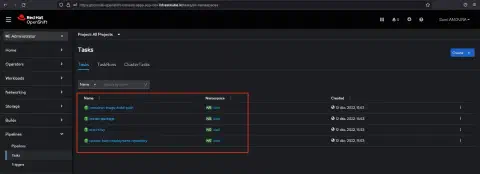
Pipeline
After having created the Tasks resources, we are now going to create the pipeline resource which will allow us to orchestrate the execution of the Tasks with, among other things, the execution order of the tasks or the conditionality of the Tasks execution.
Pipeline fruitz-quarkus :
|
Now you can go to the OpenShift console and click on Pipelines ► Pipelines ► Pipelines tab to see the created pipeline:
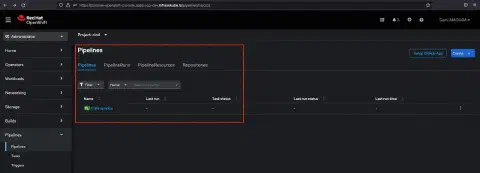
You can also click directly on the fruitz-quarkus Pipeline to have more information about it like the number of linked Tasks, Workspaces, associated Labels…
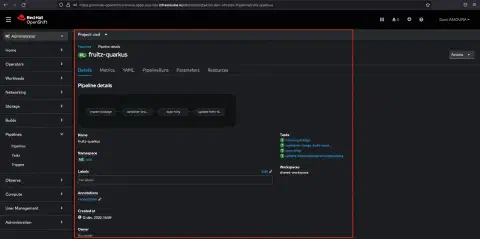
✅ The Tekton configuration is now complete.
Pipeline execution
We will now fix the application bug limiting the addition of fruits with a maximum number of characters of 6. We will extend this limit to 9 characters in order to add the fruit Pineapple.
On the fruitz-quarkus application repository (backend), edit the file src/main/java/org/sokube/hibernate/orm/Fruit.java to change the maximum number of characters to 9:
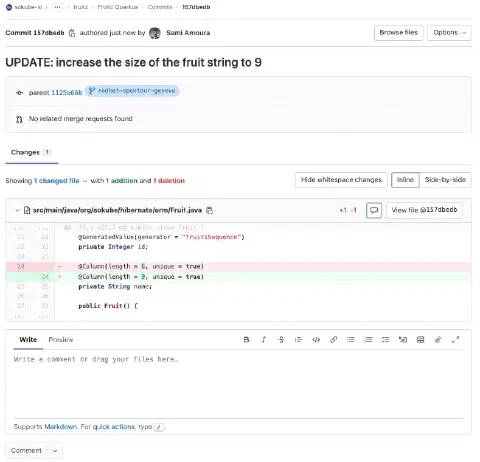
ℹ️ We can see that the commit ID is
157dbedb
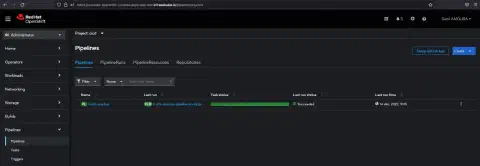
After committing and pushing the changes to the fruitz-quarkus application repository, we can see that the Tekton Pipeline has been successfully triggered and executed:
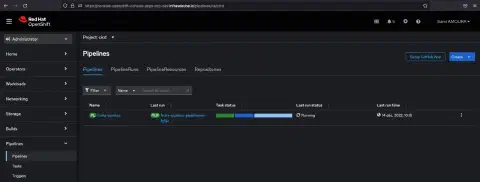
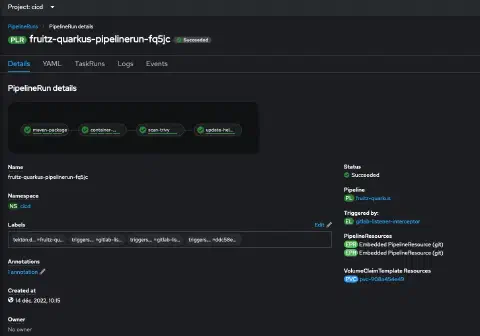
It is possible to have more details by clicking on the Pipeline:
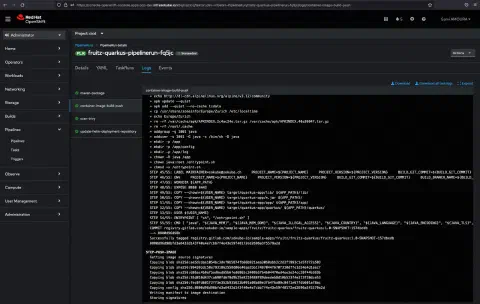
We can also have a detailed view of the different Tasks with the execution of the Steps:
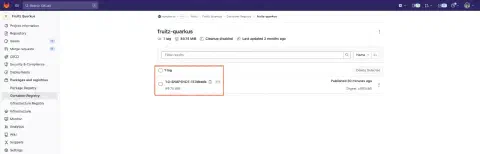
We can see that the image has been pushed to the GitLab container registry with the correct tag (commit ID 157dbedb):
On ArgoCD, we see that fruitz-backend has been redeployed with the new image and the correct tag (commit ID 157dbedb):
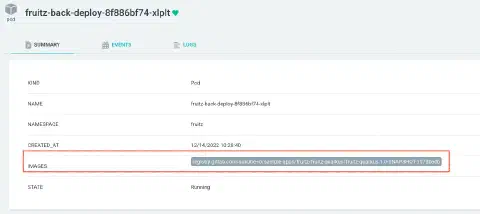

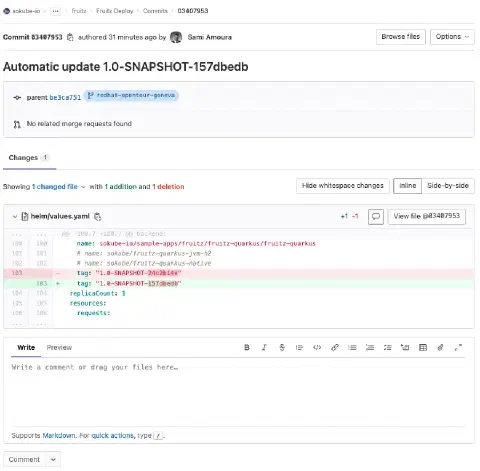
This was made possible because the Tekton Pipeline and in particular the update-helm-deployment-repository Task updated the GitOps deployment repository synchronized with ArgoCD.
Finally we can test the new functionality on the application. We can see that it is now possible to add the fruit Pineapple:
In this blog post we got to see how to set up a GitOps Cloud Native pipeline on the OpenShift platform. This article introduces the tools, how to nest them together as well as how to quickly get the hang of them. Of course, this is a demonstration for a quick experimentation, many additional things have to be taken into account in an enterprise context such as secrets management, the RBAC part around OpenShift GitOps or the steps composing the Tekton Pipeline (adding tests, defining vulnerability scans for application dependencies, pushing the image in a dedicated registry only if the vulnerability scan is negative…).
In a future blogpost we will show how to set up the ArgoCD Image Updater plugin. This tool which integrates perfectly with ArgoCD, allows to have a GitOps Pipeline even more Cloud-Native. Indeed, it allows to get rid of the Tekton task update-helm-deployment-repository which commits in the deployment repository. This part will be entirely managed by the ArgoCD Image Updater tool.
To go further, discover our ArgoCD and GitOps training and our DevSecOps consulting.