K3S + K3D = K8S a new perfect match for dev and test
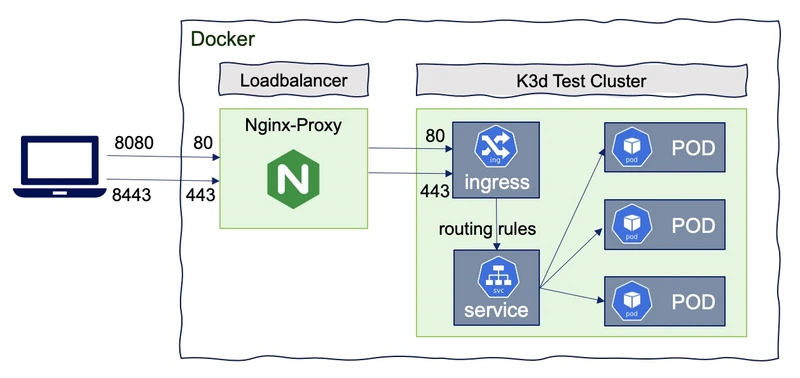
Working with Kubernetes on a local machine when you are a Dev or an Ops is not as easy as we could think. So, how to easily create a local Kubernetes cluster that would meet these needs ? At SoKube we heavily use k3d and k3s for these purposes.
More than a year ago I presented in a previous blog what is k3d (with k3s) and how to use it. In the meantime, k3d has been completely rewritten. The goals of this blog post are to show:
- What is k3d/k3s
- What’s new with k3d v3
- Create a simple kubernetes cluster on your local machine
- Create a multi-server (masters) and multi-agent (workers) kubernetes cluster on your local machine
- Create a cluster with a specific Kubernetes version
- How to replace the default CNI plugin of k3s
- How to replace the default ingress controller of k3s
- How to use a dedicated registry to download images with k3s
- What are the other Alternatives
k3s/k3d ?
k3s is a very efficient and lightweight fully compliant Kubernetes distribution. k3d is a utility designed to easily run k3s in Docker, it provides a simple CLI to create, run, delete a fully compliance Kubernetes cluster with 1 to n nodes.
K3s includes:
- Flannel: a very simple L2 overlay network that satisfies the Kubernetes requirements. This is a CNI plugin (Container Network Interface), such as Calico, Romana, Weave-net. Flannel doesn’t support Kubernetes Network Policy, but it can be replaced by Calico (see next sections).
- CoreDNS: a flexible, extensible DNS server that can serve as the Kubernetes cluster DNS
- Traefik is a modern HTTP reverse proxy and load balancer. In a next section, I will also show how to replace it either by Traefik v2 or Nginx
- Klipper Load Balancer : Service load balancer that uses available host ports.
- SQLite3: The storage backend used by default (also support MySQL, Postgres, and etcd3)
- Containerd is a runtime container like Docker without the image build part
The choices of these components were made to have the most lightweight distribution. But as we will see later in this blog, k3s is a modular distribution where components can easily be replaced.
Recently k3s has joined the Cloud Native Computing Foundation (CNCF) at the sandbox level as first Kubernetes Distribution (raising a lot of debates whether or not k3s should be a kubernetes sub-project instead).
Installation
Installation is very easy and available through many installers: wget, curl, Homebrew, Aur, … and supports all well known OSes (linux, darwin, windows) and processor architectures (386, amd64) !
Note that you only need to install the k3d client, which will create a k3s cluster using the right Docker image.
Once installed, configure the completion with your preferred shell (bash, zsh, powershell), for instance with zsh:
|
What’s new with k3d v3
In one year, the k3d team did a great job and completely rewrote k3d v3. It is therefore not a simple major version, they have implemented new concepts and structures to make it an evolving tool with very practical and interesting features.
- New terminology of k3d and k3s: To be as inclusive to the community as possible, “Server” and “Agent” words are now used to design “master” and “worker” node.
- Every cluster you create will now spawn at least 2 containers: 1 load balancer and 1 “server” node. The load balancer will be the access point to the Kubernetes API, so even for multi-server clusters, you only need to expose a single api port. The load balancer will then take care of proxying your requests to the correct server node. (can be disabled with the –no-lb flag)
- Adoption of the “NOUN VERB” syntax: This breaking change makes it easier to add new nouns (i.e. k3d managed objects) and is similar to many other cloud-native CLIs (e.g. gcloud, awscli, azure cli, …) and also provides a cleaner CLI hierarchy.
- Support of multi-server clusters (dqlite) with hot-reloads configuration when a new server node is being added to the cluster
- Handling nodes independently from clusters:
k3d create/start/stop/delete node mynode - Shell completion via k3d completion [zsh | bash | psh | fish]
- Basic plugin system support (k3d my-plugin)
- …
My first k3d cluster
Let’s create a simple cluster with 1 loadbalancer and 1 node (with role of server and agent) with name “dev”:
|
docker ps will show the underlying containers created by this command:

Ports mapping:
--port 8080:80@loadbalancerwill add a mapping of local host port 8080 to loadbalancer port 80, which will proxy requests to port 80 on all agent nodes--api-port 6443: by default, no API-Port is exposed (no host port mapping). It’s used to have k3s‘s API-Server listening on port 6443 with that port mapped to the host system. So that the load balancer will be the access point to the Kubernetes API, so even for multi-server clusters, you only need to expose a single api port. The load balancer will then take care of proxying your requests to the appropriate server node-p "32000-32767:32000-32767@loadbalancer": You may as well expose a NodePort range (if you want to avoid the Ingress Controller).
Kubeconfig:
- By default it will directly switch the default kubeconfig’s current-context to the new cluster’s context so that your “
~/.kube/config” is automatically updated.(checkout “kubectl config current-context”) - you can disable this behaviour by using flag “
--update-default-kubeconfig=false” so it will need to create a kubeconfig file and export the KUBECONFIG var:export KUBECONFIG=$(k3d kubeconfig write dev) - Removing the cluster will also delete the entry in the kubeconfig file.
- k3d provides some commands to easily manipulate the kubeconfig:
# get kubeconfig from cluster dev
k3d kubeconfig get dev

# create a kubeconfile file in $HOME/.k3d/kubeconfig-dev.yaml k3d kubeconfig write dev

# get kubeconfig from cluster(s) and
# merge it/them into a file in $HOME/.k3d or another file
k3d kubeconfig merge ...
Lifecycle:
- Stopping a cluster is very easy:
k3d cluster stop dev - Then Restarting and restoring the state of the cluster as it was before stopping:
k3d cluster start dev - Deleting a cluster is as simple as :
k3d cluster delete dev
Test with a simple nginx container application
Once the cluster running, execute the following commands to test with a simple nginx container:
|
To test : http://localhost:8080/
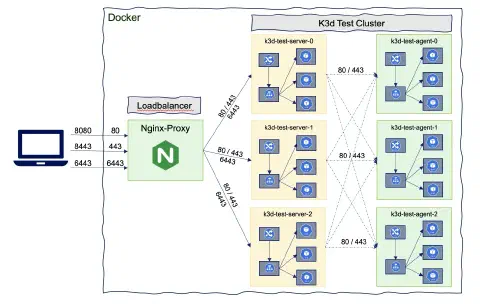
A multi-server and multi-agent kubernetes cluster on your local machine
For testing purposes and to be as close as possible of a production kubernetes cluster you can create a multi-servers and/or a multi-agents cluster:
|
Get the list of nodes:
|
Once all node are running you can deploy the same nginx application for testing. Scale the application to 3 replicas:
|
Pods should be spread over the agent nodes:
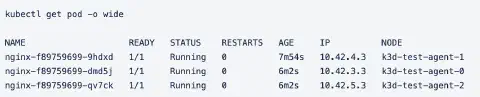
This cluster contains 7 Docker images representing the full cluster test (1 lodbalancer, 3 containers for the servers and 3 containers for the agents). Note that server nodes are also running workloads:
After the cluster has been created it is also possible to add nodes:
|
A cluster with a specific Kubernetes version
It could be very convenient to create a Kubernetes cluster with a specific version, either for a older version:
|
or a newer version:
|
The list of available versions are in the k3s docker repository. Currently, the oldest version in this repo is V1.16.x.
Use Calico instead of Flannel as the CNI plugin
Flannel is a very good and lightweight CNI plugin but doesn’t support the Kubernetes network policy resources (note that the NetworkPolicy will be applied without any error but also without any effect) ! The modularity of k3s allows to replace the default CNI by Calico. In order to deploy Calico, 2 features of k3s are used:
--k3s-server-arg '--flannel-backend=none': remove Flannel from the initial k3s installation.- ‘Auto-Deploying Manifests’ A practical feature of k3s: Any file found in
/var/lib/rancher/k3s/server/manifestswill automatically be deployed to Kubernetes in a manner similar to kubectl apply
So you will need to save locally the calico.yaml file configuration and then create the cluster with the following args:
|
Test:
|
Everything should be ok Let’s add a NetworkPolicy that denies all communications:
|
Now, the “web” pod cannot be accessed anymore !
Change the default Ingress Controller
By default k3s uses Traefik v1 as an Ingress controller but it is an old version and Traefik V2 has been released more than 1 year ago with lots of nice features, such as TCP Support with SNI Routing & Multi-Protocol Ports, Canary deployment, Mirroring with Service Load Balancers, new Dashboard & WebUI… There are plans to replace by default this ingress controller with Traefik v2 but again the modularity of k3s makes it possible to replace the default Ingress Controller using:
--k3s-server-arg '--no-deploy=traefik': to remove traefik v1 from k3s installation- ‘Auto-Deploying Manifests’ as mentioned previously
- Helm charts Operator: K3s includes a Helm Controller that manages Helm charts using a HelmChart Custom Resource Definition (CRD)
Replace using Nginx ingress controller:
Create a local “helm-ingress-nginx.yaml” file:
|
then create the cluster with the nginx Ingress Controller
|
Replace using traefik v2 controller
Create a local ‘helm-ingress-traefik.yaml’ file:
|
Then create the cluster with the Traefik v2 Ingress Controller
|
Use your own Registry
By default k3s uses the DockerHub to download images, but it could be very convenient to use your own Docker registry
- For “Air-gap” environments where no internet access is allowed
- To connect to your enterprise Docker Registry (Harbor, Nexus, Artifactory, …)
- To validate how to connect to an external registry
- For those with a poor internet connexion (keep images available on your laptop).
In this example, a very simple registry (the one from Docker) will be created as a pull through cache :
|
Create a local file “registries.yaml” with the following content:
|
host.k3d.internal: As of version v3.1.0, the host.k3d.internal entry is automatically injected into the k3d containers (k3s nodes) and into the CoreDNS ConfigMap, enabling you to access your host system from inside k3s nodes (running inside Docker) by referring to it as host.k3d.internal.
After the creation of a k3d cluster, you can check this config through:
|
Then create the k3d cluster using this registry:
|
All images (including those used internally by k3d and k3s) will be uploaded to the docker registry, you can check the contents of your registry via
|
The deployment of an nginx image will also be downloaded via the Docker registry:
|
Using “host.k3d.internal” comes in handy in other situations where you want to access a service that is on your machine or even a service that is in another k3d cluster.
Alternatives
You can find several ways and tools to work with a local Kubernetes cluster, among these:
- K3d Open source project maintained by Rancher
- Docker for Desktop free Docker product
- Minikube Open source project - Kubernetes SIGs (Special Interest Groups)
- Kind Open source project - Kubernetes SIGs (Special Interest Groups)
- MicroK8s Open source project maintained by Canonical
- k0s Open source project maintained by Mirantis
- CodeReady Container Open source project maintained by RedHat
Today, my preference goes to k3d because it combines simplicity, extreme lightness, modularity and functionality while allowing more sophisticated needs to be addressed. But things are moving very quickly with some cool and innovative features. And new projects like k0s also look very promising.
Other alternatives or tools to consider for the dev usecase:
- Skaffold handles the workflow for building, pushing and deploying your application to kubernetes
- Tye .Net developer tool that makes developing, testing, and deploying microservices easier to kubernetes
- Devspace Deploy & Develop Kubernetes Apps faster
- Oketo a cloud Kubernetes development platform
Conclusion
The Rancher team did again a great job rewriting k3d making it very easy, modular, simple and efficient to run several instances with different topologies of k3s Kubernetes clusters on a single machine.
Usages are multiples and very adapted to Kubernetes development, testing and training. k3s is a serious production distribution that also addresses the world of edge computing and IoT by creating less energy-consuming and more compact architectures allowing to evolve towards GreenIT.
Additionally, the underlying Kubernetes k3s distribution is the Cloud Native Computing Foundation’s (CNCF) first Kubernetes distribution. Its future is extremely promising, to be continued …
To go further, discover our Kubernetes training and our Kubernetes consulting.