Lightweight Kubernetes GitOps Secrets

Every day at Sokube we evangelize GitOps as a way to simplify, improve and accelerate digital operations, and we support our customers on this journey. With the abundance of technology bricks that now compose the “Cloud Native” landscape, something that years ago looked difficult and hazardous is now easily reduced to choosing the combination of products / platforms that best fits a use-case.
However, when it comes to keeping sensitive information confidential inside a GitOps approach, choices are neither multiple nor simple. With its reversible base64 encoding, Kubernetes Secrets has been the Achille’s heel of the platform regarding information security or confidentiality whether or not RBAC has been correctly configured. Native Kubernetes Secrets to store confidential or sensitive information should be purely prohibited on production systems, at least.
Couple of GitOps-friendly alternatives that preserve confidentiality have naturally emerged as workarounds: the first part of this article will be focusing on a short overview of what’s existing. While Hashicorp Vault remains a truly secure, feature-rich and widely adopted solution, we believe it is positioned rather as an enterprise-wide or cross-organizational solution for confidential information. In the context of GitOps however, it would distort the “git as single source of truth” principle. Finally, a pertinent deployment of HashiCorp Vault often requires the appropriate organizational changes as well as a solid budget for its operations.
In the second part of the article, we will focus on two lightweight solutions which provide exactly what is needed for GitOps without disrupting the organization, the project and the budgets : Bitnami Sealed Secrets and Soluto’s Kamus.
Kubernetes Secrets Landscape
Most of our use-cases involve on-premise only installations, so while Amazon, Azure, and Google usually provide their secret management for their platform, we’ve focused primarily on the on-premise solutions, and we have evaluated:
- Complexity: Overall we have estimated the efforts to get a grasp on the solution, to install and operate it.
- Maturity: Based on the number and frequency of the releases, the age of the solution, the practical examples found on the web that demonstrate its adoption
- Scope: Classify the scope of validity of the secrets, organization meaning that there is no specific restriction of validity of the secret, contrary to cluster or service account where the secret can’t be decrypted on another specific cluster or with another service account.
- Dependency: This is an important aspect of the solution that makes it more or less applicable in particular contexts
| Solution | Category | Complexity | Maturity | Secrets Scope | Dependency | Note |
|---|---|---|---|---|---|---|
| Helm Secrets | On Premise | MEDIUM | Abandoned | Org | None | Abandoned, fork jkroepke/helm-secrets |
| Kamus | On Premise | LOW | Alpha | Service Account Cluster | None | Promising |
| External Secrets Operator | On Premise (needs a cloud KMS backend) | LOW | Alpha | Org | Needs a KMS backend behind | Very young, needs a KMS behind |
| aws-secret-operator | On Premise (needs a AWS SM backend) | LOW | Alpha | Org | Needs AWS SM behind | Needs AWS Secrets Manager |
| KSOPS | On Premise | LOW | Alpha | Org | SOPS Kustomize | Can integrate with ArgoCD |
| Kapitan with Tesoro | On Premise | LOW | Alpha | Org | Kapitan KMS backend | Nice but makes sense with kapitan only |
| Bitnami Sealed Secrets | On Premise | VERY LOW | Stable | Cluster | None | Simple but need to copy keys across clusters |
| Godaddy Kubernetes External Secrets | On Premise (needs a cloud KMS backend) | LOW | Stable | Org | Needs a KMS backend behind | Nice wrapper but needs a KMS behind |
| Hashicorp Vault | On Premise Hosted | HIGH | Stable | Org | None | Proven solution but cost of implementation/management is HIGH |
| Banzai Cloud Bank-Vaults | On Premise | MEDIUM | Stable | Org | Hashicorp Vault | Simplifies Vault but still requires Vault |
| Kustomize secret generator plugins | On Premise | HIGH | Stable | Org | Needs a service behind | Requires to develop a plugin and a service behind |
Bitnami Sealed Secrets
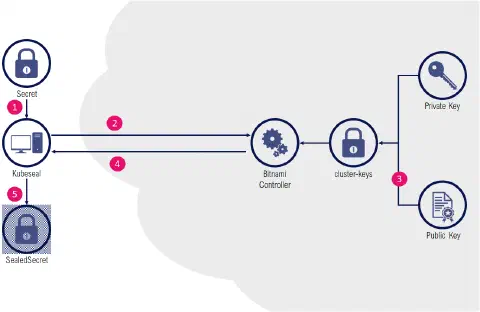
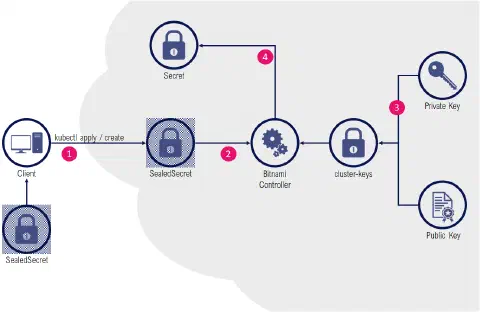
The Bitnami Sealed Secrets solution is based on a controller that runs in the target cluster, where a cluster-specific pair of private/public keys is generated.
Encryption
The public key is used by a client binary (kubeseal) to live-encrypt data (in the form of custom resources named SealedSecret). This operation can also be done offline (without the need for a cluster with a bitnami controller) by using the controller certificate (public key) that can be downloaded from the cluster. The resulting resource is a SealedSecret that is safe to store inside a git repository.
Decryption
The controller detects the presence of SealedSecret resources and automatically decrypts the content in an equivalent standard Secret resource.
Installation
Installation of the solution is relatively easy:
$ kubectl apply -f https://github.com/bitnami-labs/sealed-secrets/releases/download/v0.13.1/controller.yaml
The client tool (kubeseal) to interact with the controller inside the target cluster is a standalone binary that can be downloaded separately:
$ wget https://github.com/bitnami-labs/sealed-secrets/releases/download/v0.13.1/kubeseal-linux-amd64 -O kubeseal
Usage
We will use a specific namespace:
|
Bitnami’s kubeseal can be used as a pipe command, and when it’s combined with the dry-runs capabilities of kubectl, we can generate sealed secrets without even intermediate resources stored locally as files:
|
The resulting SealedSecret can be stored safely inside a git repository:
|
Applying the resource:
|
Checking the resource:
|
Notes
Important to know: Each sealed secret is encrypted with its own random asymmetric key that is specific to the sealed secret name and namespace. Copy-pasting the encrypted data for another secret or in another namespace won’t work.
By default, SealedSecrets generated for a cluster won’t work with another cluster (the installation of the Bitnami Controller creates a new pair of public/private keys), which could make the overall GitOps staging operations cumbersome (each environment would need to have its custom SealedSecrets). One solution is to export/import the same set of key pairs from one cluster to another. However a compromised key on a cluster would also grant access to all sealed secrets on all clusters with the same key pair.
Summary
➕ Simplicity of setup and usage
➕ Mature and well maintained solution
➖ Regular Secrets are still exposed
➖ No usage outside Secrets (e.g. ConfigMap)
Kamus
The Kamus solution offers two different mechanisms for secrets generation. One that is similar to Bitnami Sealed Secrets, another which is a true zero-trust secrets management solution.
First mode: KamusSecret
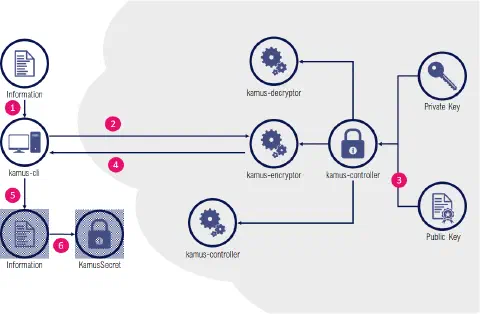
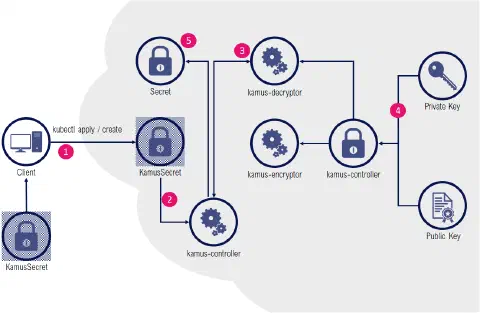
KamusSecret tend to mimic the Bitnami Sealed Secrets : a controller inside the cluster detects KamusSecrets and provide a decrypted version as a Secret.
The encoding part is a bit more tedious, as the kamus-client doesn’t support passing a whole Secret resource but rather works as a raw encryption service: individual items need to be separately encrypted with the client, and aggregated manually inside an “envelope” KamusSecret definition.
As with Bitnami, the controller is responsible to decrypt a KamusSecret as a regular Secret.
Second mode: Zero-Trust Secrets
Contrary to a Bitnami Sealed Secret or a KamusSecret, Kamus zero-trust mode has the huge advantage of never revealing the decrypted data except for the intended service at runtime.
The encryption part of the zero-trust secrets mode is very similar to the previous example: instead of wrapping encoded data in a KamusSecret, a ConfigMap will be used to store secrets as encrypted files in a mounted ConfigMap volume.
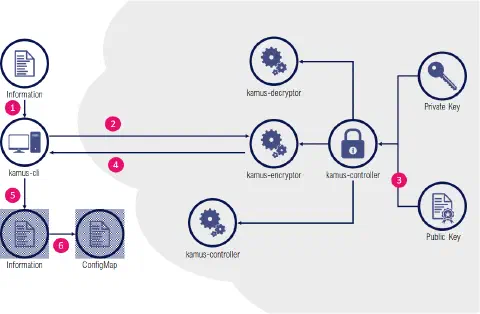
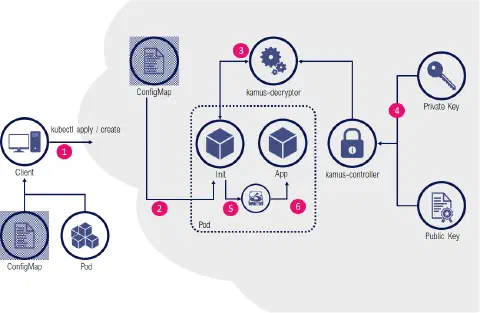
For consumption of secrets, an initContainer is invoking the kamus-decryptor service and decrypted results are stored in an ephemeral emptyDir volume accessible only for the application container in the pod.
Installation
Installation of the Controller and its CustomResourcesDefinitions is relatively easy:
|
We’ve added here the random key generation as the solution comes (dangerously) with a predefined key. Also, contrary to Bitnami, the solution installs its workloads in the default namespace so we recommend tweaking the helm release accordingly. Finally, replicas in the encryptor/decryptor deployments are set to 2 by default, which might be unnecessary.
The Kamus client is unfortunately an npm package (a debatable choice that forces users to install npm package manager). A Docker container image seems to be available, however it’s not mentioned on Kamus website so we have chosen to stick to the documented approach:
|
We will use a specific namespace and a specific service account:
|
The kamus-cli also needs an exposed encryptor pod as an URL:
|
KamusSecret Usage
First scenario, setting up a KamusSecret containing our sensitive information:
|
Then we need to create a KamusSecret envelope object based on the following structure (please note that documentation refers to a data section which doesn’t seem to be relevant or working, so we’ve used the stringData syntax).
|
$ kubectl apply -f kamus.yaml
|
$ kubectl get kamussecrets.soluto.com -n my-namespace NAME AGE db-credentials 20s $ kubectl get secrets -n my-namespace NAME TYPE DATA AGE default-token-sc4ds kubernetes.io/service-account-token 3 9m3s db-credentials Generic 2 53s
|
$ kubectl get secrets -n my-namespace db-credentials -o jsonpath=’{.data.DBUSER}’ | base64 –decode mydbuser $ kubectl get secrets -n my-namespace db-credentials -o jsonpath=’{.data.DBPWD}’ | base64 –decode highlysecret
|
$ cat «EOF >kamus-encrypted-secrets-cm.yaml apiVersion: v1 kind: ConfigMap metadata: name: kamus-encrypted-secrets-cm namespace: my-namespace data: DBUSER: 0XZm9vDLVvjNGCgeFZqNnA==:GoaTZCXkwyfoBNRwjtgsOQ== DBPWD: NlHRuvaqFlip5mDP6d5cDw==:OVW3C2hY/wZW6o2I+YjL5Q== EOF
|
$ cat «EOF >kamus-pod.yaml apiVersion: v1 kind: Pod metadata: namespace: my-namespace name: kamus-zero-trust-example spec: serviceAccountName: dummy-sa automountServiceAccountToken: true initContainers:
- name: “kamus-init”
image: “soluto/kamus-init-container:latest”
imagePullPolicy: IfNotPresent
env:
- name: KAMUS_URL value: http://kamus-decryptor.default.svc.cluster.local/ volumeMounts:
- name: encrypted-secrets mountPath: /encrypted-secrets
- name: decrypted-secrets mountPath: /decrypted-secrets args: ["-e","/encrypted-secrets","-d","/decrypted-secrets", “-n”, “config.json”] containers:
- name: app
image: busybox
imagePullPolicy: IfNotPresent
args: [“sleep”, “3600”]
volumeMounts:
- name: decrypted-secrets mountPath: /secrets volumes:
- name: encrypted-secrets configMap: name: kamus-encrypted-secrets-cm
- name: decrypted-secrets emptyDir: medium: Memory EOF ```
Create our application pod:
|
Notes
Please note that:
- in the case of a KamusSecret (first method), the –service-account and –namespace arguments for the kamus-cli command line, although mandatory, are purely arbitrary: the encrypted data with a KamusSecret is not linked to a particular service account and/or namespace, and their existence is not a requirement at encryption time.
- On the contrary, in the case of a Zero-Trust mode (second method), having the service accounts and namespaces consistent between the encryption steps and the ones used inside the initContainer are fundamental. Another service account, or another namespace won’t trigger a proper decryption.
Summary
➕ Multiple operating modes
➕ Working in zero-trust environments
➕ Can use a true KMS backend
➖ Confusing documentation
➖ Still early stages
➖ Its npm based client
Conclusion
While Kamus offers more options than Bitnami, it requires substantially more efforts for the most common scenarios. The documentation coming with the solution is also sometimes confusing, although there have been significant efforts on clarity since the early releases. Some customers and audience will be particularly receptive to its ability to operate in a zero-trust environment despite it requires a significant setup and injection of init containers in workloads. It also can use sophisticated and cryptographic secure vault solutions as a backend, which is also a strong argument when this is a requirement.
In most common scenarios however, Bitnami Sealed Secrets remains particularly effective, compact and straightforward to operate. It’s been around since quite some time now, is well maintained and is becoming a de-facto answer for lightweight secrets management for GitOps workflows for very good reasons.
As usual, there is no best all-around alternative, but there’s always the best answer to a particular use-case with some requirements and constraints from the environment. We hope this article will help you selecting the secrets solution for your GitOps scenarios.
To go further, discover our ArgoCD and GitOps training and our DevSecOps consulting.